
The steps to set up Gavel lower titles that pull in the names and titles from the following spreadsheet: P:\Gavel2021\Legislators.xlsx.
Add a group for legislators
Give it a take ID with enough numbers after it – to automatically populate, the titles in this group must be sequentially numbered starting from the group’s take ID.

Drag the “Lower title” scene into the group as usual
Give the first title in the group a take ID one greater than the take ID of the group.

Turn off the “Static lower third text”
Uncheck its “visible” option in the “Template Data” tab of the Take Inspector

Set the “Web data” fields to use Legislator data
Line 1
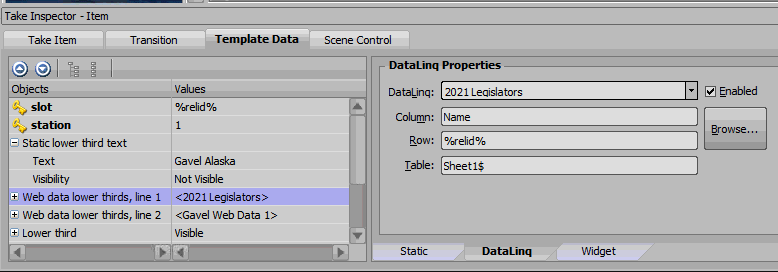
In the “Template Data” tab, select the “Web data lower thirds, line 1” field and set its DataLinq properties as follows:
- DataLinq: 2021 Legislators
- Column: Name
- Row: %relid%
- Table: Sheet1$
Line 2
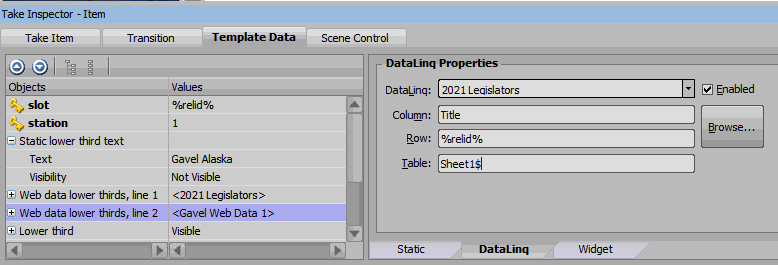
Select the “Web data lower thirds, line 2” field and set its DataLinq properties the same as line 1, but in the Column field put “Title” (instead of “Name”).
Duplicate the title
You’re done setting up the take item for the first title. Just duplicate it as many times as you need and each title in the group should automatically fill with a row from the spreadsheet (assuming the take IDs are sequential starting with the group take ID).