Skip to content
KTOO docs

View form entries

August 10, 2021December 1, 2017 by David Purdy

Under Forms in the left-hand menu click on Entries


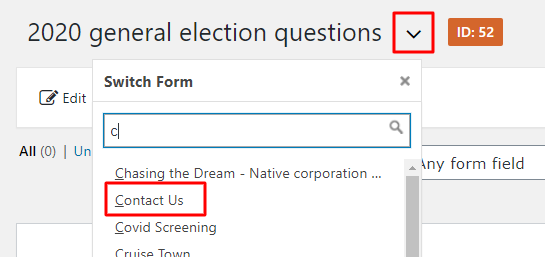
Click the down arrow after the form title, and choose the form you want from the Switch Form dropdown.

(You can type in the search box to filter the forms that are shown.)

Click on entry titles to view the full entry

Bold entries are unread


You can also export/download form entries as a CSV file

Categories Forms
Change category page layouts
Export form submissions

Categories

  • Podcasting (3)
  • TV (8)
    • Technical documentation (4)
    • Gavel Graphics (4)
  • Web Sites (64)
    • Ask Module (5)
    • Tools (2)
    • Block Editor (4)
    • Announcements (2)
    • Gavel (3)
    • Author plugin (4)
    • Listing & Home Page Layout (9)
    • Events (2)
    • Ads (2)
    • Post Layout & Multimedia (1)
    • KTOO 360TV videos (2)
    • Forms (7)
    • Slideshows (3)
    • Technical Documentation (6)
  • News and Style (7)
  • Promotion (2)
  • Social Media (7)
  • Workflow & Processes (35)
    • TV Automation (31)
    • NETA Distribution Processes (2)
    • TV PROMOTION (1)
  • Uncategorized (6)
  • IT (1)
  • Radio (1)

Recent Posts

  • Set up a podcast
  • Prevent conflicting ads from running together
  • MailChimp signup forms
  • Update Allegiance premiums
  • Switching between the Classic Editor and the Block Editor
© 2026 KTOO docs • Built with GeneratePress