
Videos from Invintus should show up in WordPress within a minute or two of being created in the Invintus control center. Similarly, when you change an Invintus video, WordPress should quickly reflect the changes.
If you ever have a situation where WordPress does not mirror Invintus almost immediately, please let David Purdy know. It’s important to catch and understand any situations where this doesn’t happen so we can fix any issues.
For the following instructions, you will need a WordPress account. See your producer or digital services for an account.
Force a video on WordPress to sync with Invintus
To force a video to get the most recent information from Invintus
Log into WordPress
Navigate to the video and look for the “Invintus Video” menu item in the black bar at the top of the page

Choose “Sync this video with Invintus” from the dropdown.
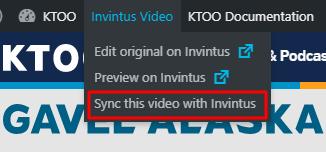
The page should refresh (which might take significantly longer than usual) and when it reloads it should have the latest content from Invintus.
Go straight to Invintus from a video on WordPress
When browsing KTOO.org (while logged into WordPress), you can jump straight to the Invintus version of a video.
In the Invintus Video menu (described above), are two links.
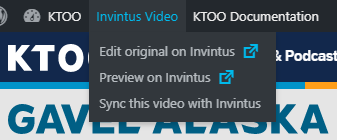
- Edit original on Invintus will open the editing screen for that video in the Invintus Control Center (if you are already logged into Control Center)
- Preview on Invintus will show you the Invintus player itself on their platform (useful for troubleshooting anything that looks wrong with the one on ktoo.org – this player is the authoritative version)